

We’re living in a time when digital tools have become part of our everyday reality, even in areas we couldn’t have imagined just a few years ago. We often hear complaints about how much time we actually spend in front of screens and how tied we are to our computers and phones. And it’s true, the pace of life keeps accelerating, business demands keep growing, and it’s hard to imagine getting through the day anymore without the right tools.
But the key isn’t digitizing absolutely everything, it’s choosing wisely. Every company needs to ask itself: which processes are eating up too much of our time and money, and where would we be better off stepping back, for example, from bureaucracy and other tasks unrelated to developing our product or service? Once we automate the time-consuming tasks, we finally get back the time for what really matters, growing and developing our core business.
When does automation become unavoidable?
Automation doesn’t become unavoidable overnight, and it has nothing to do with a company’s size or number of employees. Problems arise when tasks that aren’t directly tied to our core business start eating up too much time or slowing down our processes.

Automation becomes essential in situations like operational overload and the inability to grow the team, for example, when highly skilled staff spend more than 20–30% of their time managing documentation, or when a company doesn’t have the budget for the team expansion it desperately needs, or simply can’t find new employees in the job market. In these cases, automating routine tasks is the solution. Another problem is that as workload increases, the error rate rises along with it, which makes manual processes unsustainable. On top of that, manual or poorly digitized processes slow down response times, opening the door for other companies that, thanks to better-optimized processes behind the scenes, can offer lower prices and faster service.
Many companies today are also grappling with regulatory pressure and traceability requirements. Strict industry or medical standards demand full, real-time traceability of documents, certificates, and changes. Managing archives manually poses too great a risk during inspections and can lead to financial penalties if documentation or processes aren’t handled properly. Another challenge arises when companies grow and open new branches abroad or in other locations, where control is often lost and the system needs to be unified.
What Are the First Steps in Preparing a Company for Automation?
Before actually implementing a system, there are key first steps that pave the way to successful automation. That’s because automation can only really begin once we thoroughly know and understand our company’s processes.
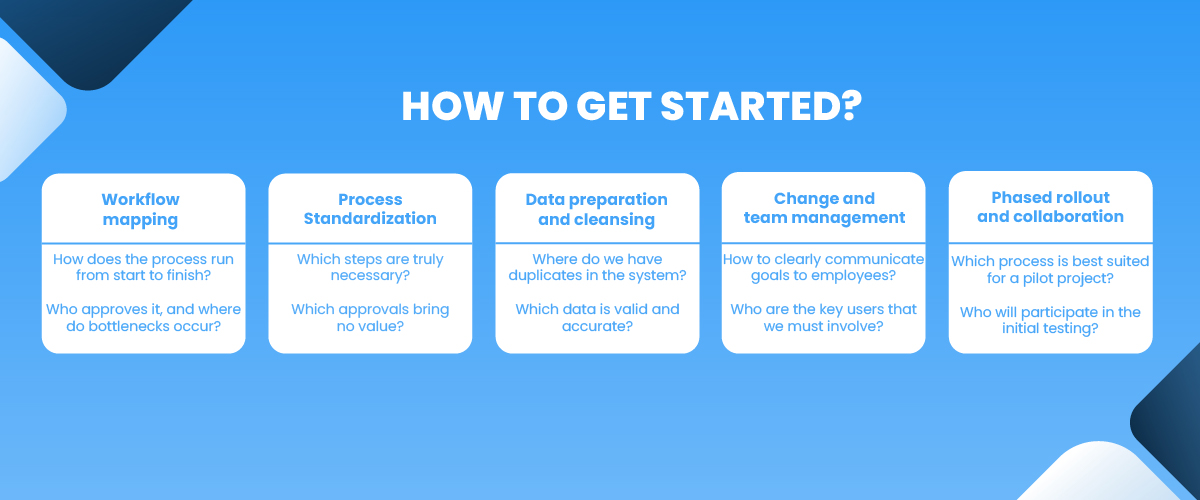
1. Mapping out the workflow
The first step is always a precise description or diagram of how processes and documents flow, from the entry point all the way to final archiving.
We focus on questions like: Who approves what, where do bottlenecks form, and where is data still being copied by hand? We pay special attention to those bottlenecks and look for tasks that take up the most employee time, happen often, and follow clear rules.
2. Standardizing processes
Before automating, it’s time to cut out any unnecessary steps, since modern solutions can now automate even complex processes with plenty of exceptions and special cases. In this phase, we strip out every step and approval that isn’t strictly necessary or doesn’t add real value.
3. Preparing and cleaning up data
If our system is a mess, it’s hard to make sense of it and separate reliable, valid data from the rest. That’s why this phase is dedicated to thorough data cleanup: tidying up databases and eliminating duplicates.
4. Managing change and bringing the team on board
The biggest reason automation projects fail is often employee resistance, people worried about losing control or even their jobs. That’s why it’s essential to involve key users early on and communicate clearly that the goal of automation is to lighten the team’s load, not replace it.
5. Gradual implementation
Don’t try to automate everything at once. Choose a pilot project and start with one well-defined process where results are quickly visible. Testing and fine-tuning matter just as much: put the system through its paces with a smaller group of users, gather feedback, and iron out any shortcomings before rolling it out company-wide.
Why Do Most Automation Projects Fail Right at the Employee Rollout Stage?
Every employee is used to working within a specific system that the company has built up over years of operation. Changing the way people work, that is, introducing automation, can therefore trigger real resistance among staff. And if the team won’t actually use the new system, it won’t do us much good in practice.
But the answer isn’t to avoid automating processes out of fear of that resistance. What matters most is helping employees overcome their fear of losing control or being replaced. On top of that, every new automation needs to be explained to the team as clearly as possible, backed by proper training and ongoing support.
What Are the 3 Key Phases for Successfully Rolling Out Change in a Company?
Preparation (before you even begin)
Find your internal champions: In every department, purchasing, logistics, sales, accounting, identify the colleagues who are comfortable with technology and whom others naturally turn to for advice. These people will be your first line of support and your ambassadors for the change.
Explain the “why” clearly: Don’t just walk employees through how the new system works, explain why you’re introducing it in the first place. Spell out the concrete benefits for them: “This means less manual typing, fewer errors, and a lot less stress during inspections.”
Execution (training and go-live)
Training tailored to the role: Skip the long, one-size-fits-all lectures for the whole company at once. Tailor your workshops to specific roles instead, a warehouse worker needs completely different instructions than a sales rep.
Learning on real examples: Set the theory aside. Let the team learn using the actual documents and cases they deal with in their day-to-day work.
Step by step: Don’t dive in headfirst by switching the whole company over overnight. Start with one department or process, bank the early wins, and then gradually roll the best practices out further.
Reinforcement (once the system is up and running)
Fast help, no waiting: In the first few weeks after go-live, be available to the team at all times. Resolve every doubt or small hiccup right away to keep frustration from building up.
Listen and adapt: Keep the door open for suggestions, questions, and criticism. Once employees see that their feedback is genuinely being taken into account and shaping the system, they’ll make the new way of working their own much faster.
How Do We Make the Transition to a Document Management System Easier and Help Employees Adapt Their Work Habits?
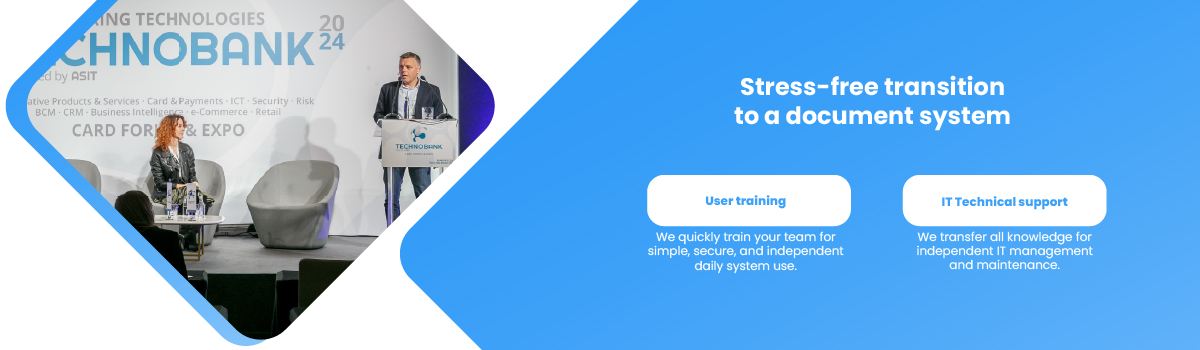
At Soluma, we make it easier for companies to move to a new document management system through comprehensive training tailored to every level of user. Our goal is to ensure smooth, uninterrupted operations and give your team complete independence:
- Training for end users: We quickly and effectively equip your team to use the system in their everyday work, simply and securely.
- Technical training for your IT department: We give your specialists all the knowledge they need to independently manage, maintain, and customize the document system, so you keep full control in your own hands.
We believe an outstanding user experience always has to come first. It’s a principle we live by consistently, both in how we design the intuitive structure of our products and in how we build reliable, responsive relationships grounded in true partnership.
Where Are You Right Now on Your Automation Journey?
Not sure where your company currently stands? Leave your email below and we’ll send you a short questionnaire that helps you pinpoint exactly where you are on your automation journey.
The Digital Future Is Here: What's Your Next Step?
Digitalization isn’t a passing trend in modern business, it’s a necessity for saving time and lightening the load on your team. But a successful transition takes careful planning, a gradual rollout, and a deep understanding of your work processes.
The real key to success is your people: technology only delivers the results you’re after when it’s properly supported and the team genuinely makes it their own.